Les 2 - Vue3 layouts and pages
Les overzicht
- De algemene structuur van Vue3 beter begrijpen en onderzoeken wat de architectuur is en hoe een Vue applicatie opgebouwd wordt.
Samenvatting
- Vue folder structuur en architectuur
- Deel 2 van de TOH applicatie bouwen
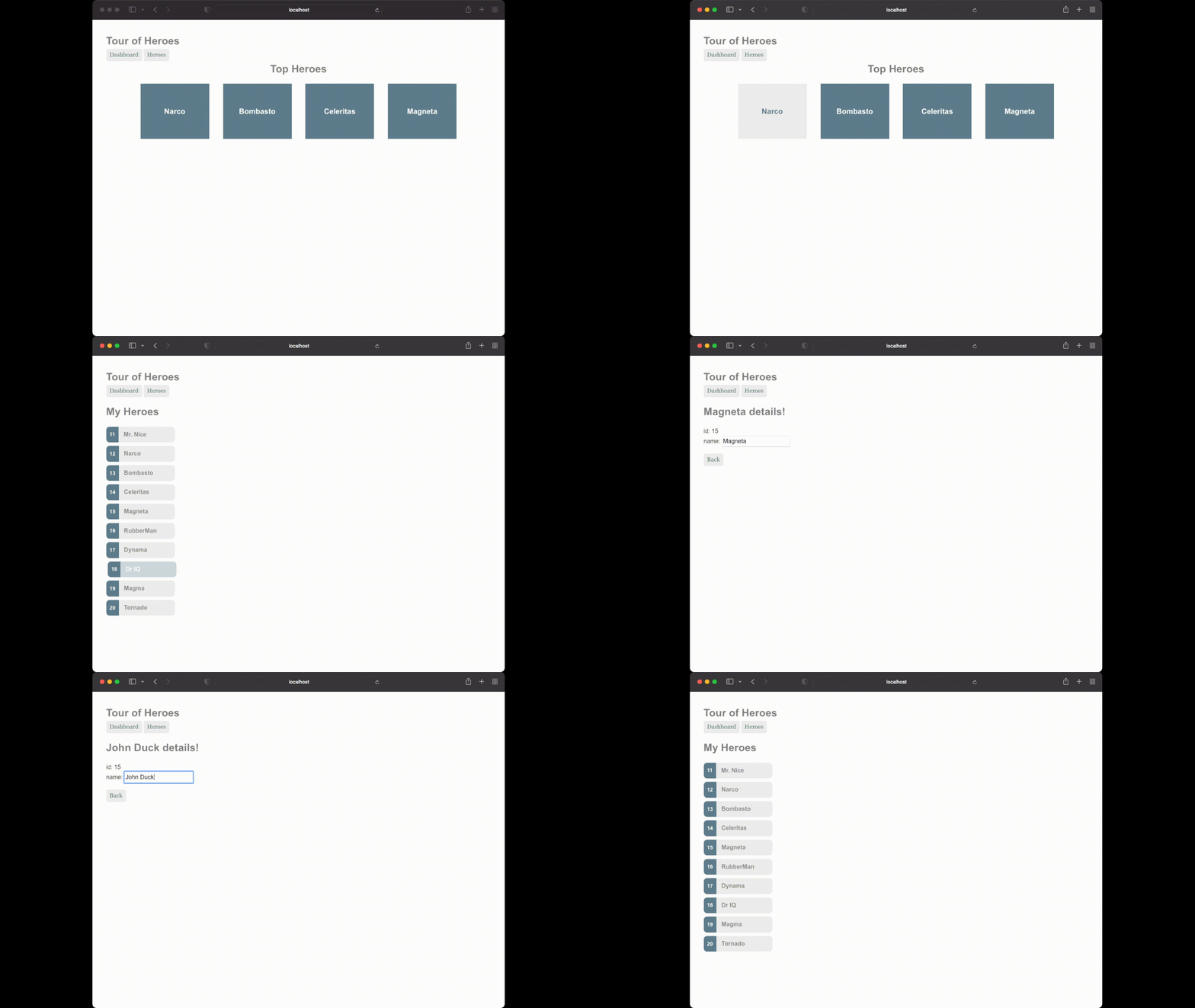
Stap 1 - Dashboard view + HeroesView
- Inhoud top heroes toevoegen + styling
.title {
    font-size: 1.5rem;
    color: grey;
    font-weight: bold;

    display: flex;
    justify-content: center;
    margin-bottom: 1rem;
}

.top-heroes {
    display: flex;
    justify-content: center;
    flex-wrap: wrap;
    gap: 2rem;
}

.top-hero {
    display: flex;
    justify-content: center;
    align-items: center;

    background-color: #5f7d8c;
    color: white;

    height: 8rem;
    width: 10rem;
    font-weight: 600;
    font-size: 1.1rem;
}

.top-hero:hover {
    background-color: #eeeeee;
    color: #5f7d8c;
    cursor: pointer;
}
<div>My Heroes</div>

  <div>11 Mr. Nice</div>
  <div>12 Narco</div>
  <div>13 Bombasto</div>
  <div>14 Celeritas</div>
  <div>15 Magneta</div>
  <div>16 RubberMan</div>
  <div>17 Dynama</div>
  <div>18 Dr IQ</div>
  <div>19 Magma</div>
  <div>20 Tornado</div>
<style scoped>
  .title {
    font-size: 1.5rem;
    color: grey;
    font-weight: bold;

    margin-top: 1rem;
    margin-bottom: 1rem;
  }

  .hero-list {
    display: flex;
    flex-direction: column;
    gap: 0.5rem;
  }
  .hero {
    display: flex;
    max-width: 10rem;
    background-color: #e6e6e6;
    cursor: pointer;
    color: #8d8d8d;
    border-radius: 0.5rem;
  }
  .hero:hover {
    background-color: #cfd8dc;
    color: white;
    margin-left: 0.25rem;
  }

  .hero-number {
    display: flex;
    justify-content: center;
    align-items: center;

    background-color: #5f7d8c;
    color: white;
    border-top-left-radius: 0.5rem;
    border-bottom-left-radius: 0.5rem;
    padding: 0.5rem;
    font-size: 0.75rem;
    font-weight: 600;
  }
  .hero-name {
    padding: 0.5rem;
    padding-left: 0.75rem;
    font-weight: 600;
  }
</style>
Stap 2 - for loop in Heroes
with or without setup in script
- With data binding is a lot simpler
- IDE support is easier -> regular JS / TS
- No need to write your own setup function -> works out of the box
For loop
- Move heroes to array
const heroes = [
    { number: 11, name: "Mr. Nice" },
    { number: 12, name: "Narco" },
    { number: 13, name: "Bombasto" },
    { number: 14, name: "Celeritas" },
    { number: 15, name: "Magneta" },
    { number: 16, name: "RubberMan" },
    { number: 17, name: "Dynama" },
    { number: 18, name: "Dr IQ" },
    { number: 19, name: "Magma" },
    { number: 20, name: "Tornado" },
  ];
- v-for directive
- vbind-key -> afgekort naar :key = moet uniek zijn binnen de pagina want wordt gebruikt voor optimale rendering van de pagina door vue (virtual dom)
Stap 3 - click to see details
- div with selectedHero
- click directive
- function setSelectedHero
- Nothing happens? Need a ref
- template because this works nicer with the v-if directive
    <template v-if="selectedHero">
        <div class="title">{{ selectedHero.name }} is my Hero</div>
        <button>Details</button>
    </template>
Dynamic styling
- dynamic class -> hetzelfde als een gewone class maar er zit een binding op -> Betekent dat we die conditioneel wel of niet kunnen laten tonen.
- Aantonen adhv een class op de title met een kleur bv
:class="{'active': true}"
- add
hero--active - Add to correct element
- No need to do
.valuefor ref element
.hero--active {
    background-color: #cfd8dc;
    color: white;
    margin-left: 0.25rem;
}
Add uppercase function for title
- also show how it could be done with css
- do it with a function
- Showcase arrow function
- explicit vs implicit return
Ons eerste component
- Button needs to be same as the MainLayout button
- Copy / paste -> issue with repetition and maintainability
- CUSTOM COMPONENT -> Styled button
- Show with slot and with props
- Also use in MainLayout
Stopped here
Stap 4 - Navigate to details page
- useRouter in HeroesView
- add onclick handler to details button which navigates to specific hero page
- Show with hardcoded value and then with the actual value
- ? -> not strictly needed because of v-if but can't hurt /shrug
<script setup lang="ts">
  import StyledButton from "@/components/StyledButton.vue";
  import { ref, type Ref } from "vue";

  interface Hero {
    number: number;
    name: string;
  }

  const hero: Ref<Hero | null> = ref(null);
</script>

<template>
  <template v-if="hero">
    <div class="title">{{ hero.name }} details!</div>

    <div>id: {{ hero.number }}</div>
    <div>name: <input :value="hero.name" /></div>

    <StyledButton>Back</StyledButton>
  </template>
</template>

<style scoped>
  .title {
    font-size: 1.5rem;
    color: grey;
    font-weight: bold;
    margin-top: 1rem;
    margin-bottom: 1rem;
  }
- Change the hero variable to showcase it works
Stap 5 - refactor reusable things
-
Interface Hero wordt meerdere keren gebruikt -> naar een aparte file -> In dit project zeker ok omdat het niet zo groot is, voor grotere projecten gaan we dat typisch anders doen
-
.title common naar main.css
-
Heroes list ff dupliceren -> Voorlopig, wordt opgelost in 1 van de volgende lessen
-
lifecycle component
onMounted-> Uitleggen wat de lifecycle van een component is -
useRoute om de huidige route te kunnen gebruiken
onMounted(() => {
    const heroID = Number(route.params.id)
})
- Waarom noemt het id? -> Zie router
- Find hero in list with the correct id
- default undefined or ??
null - ref zonder waarde is altijd undefined
- ternary operator; null coalescing or full if/else
Stap 6 - No hero found
- Add v-if template no hero found (class title)
- Show v-if / v-else
Stap 7 - Back button
useRouter- As we're used to it OR
router.go(-1)
Stap 8 - Two way binding
- Tot nu toe 1 way binding -> Properties komen binnen in de html en worden getoond
- 2 way = als de values in de html geupdate worden -> Rendered opnieuw met nieuwe waarden
- 2 way binding kunnen we doen met
v-model - Door
v-modelte declareren op een variabele wordt die variabele gewatched voor 2 way binding
Stap 9 - Autorefresh ipv manual refresh
- watch toevoegen
watch(
    () => route.params.id,
    (newID) => {
        console.log(newID)
        initialiseHero()
    }
    )
- immediate om onmount te skippen
- Eerste param van watch moet een functie zijn tenzij het een ref is dan niet
Conclusie
- Componenten
- Pages / Views
- Layouts
- Identificeren van deze dingen